Color Clipping Issues

Color Clipping Issues

NLP V3.1.0

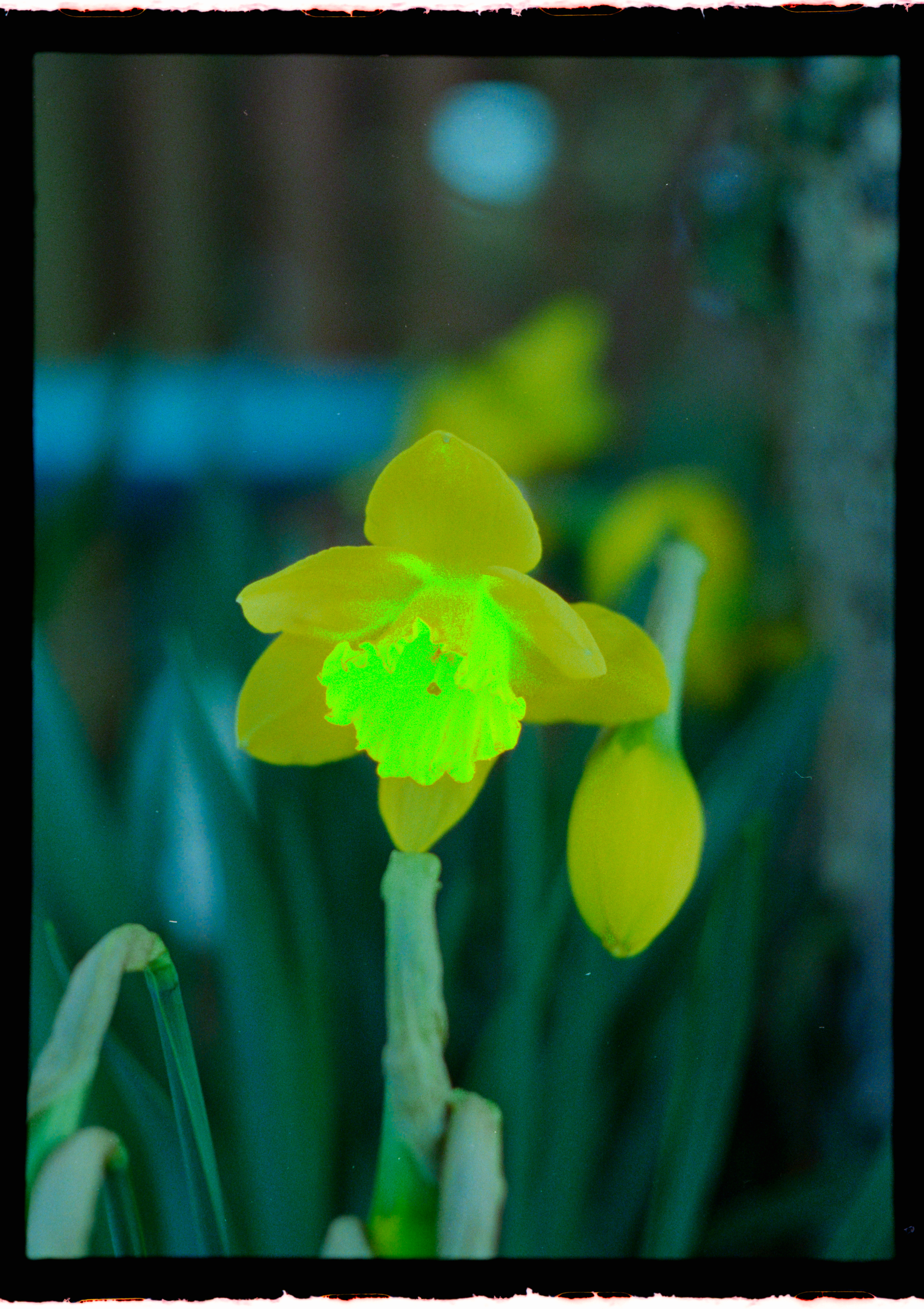
Canon R5, RF 100mm f/2.8L, CS-LITE+ SpectraCOLOR™ Light Source, 1/6s @ f/8.0, ISO 100

Hi, all -

Could you help me understand why I am seeing the color clipping below? This was taken with CineStill 400D, which certainly blooms the highlights, but the lab preview scans I have of this photo was able to recover detail within the flower. Other photos of these flowers had the same result in NLP. I’ve fiddled with all the settings I could think of in NLP, but am unable to recover the detail or get consistent colors.

Am I underexposed my scan for the density of those highlights? I maintained the same exposure settings across roll to take advantage of Roll Analysis (which seems to generally provide better results and is a welcome feature :+1: ).

I’m not overly concerned about getting good results on these specific images since they were just test shots, but I would like to understand what is happening here for future reference. New to DSLR scanning / NLP and really happy with the results compared to the lab scans - this example notwithstanding. :slight_smile:

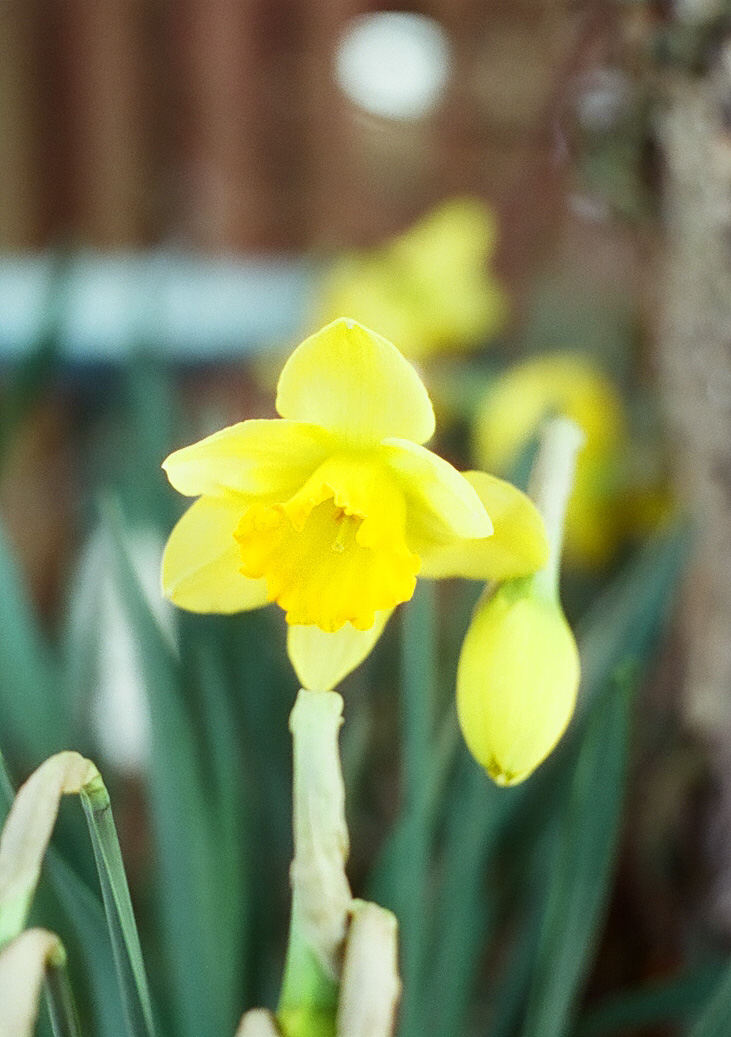
Lab scan below since I can only add one photo to the first post.

Welcome to the Community Jacob.

It looks to me like Saturation clipping. I’d try two things: (1) Reduce exposure when capturing the negative, and (2) once in Lightroom try desaturating the offending colour to the point where the clipping goes away.

Thanks for your suggestions, Mark.

Using the color mixer / point color, I was able to drive down the saturation of the yellow and it did recover some detail, but at the cost of a very muddy, brown looking flower. I decided to bring out the negative again and rescan - this time with 1, 2, and 3 stops overexposed and underexposed according to my camera’s meter. The 3 stop overexposed image recovered the detail, but was very grainy.

I tried used my camera’s build-in HDR mode to exposure bracket and combined the images. With a bunch of fiddling, I was able to get a workable image - though not something I’m super satisfied with since there are some strange artifacts left over from the edits. I don’t understand why my 3 stop overexposed image was so grainy at the flower center or why the yellow seems especially sensitive to these harsh saturation extremes.

Looking at the negatives just with my eyes, the flowers are much more dense/darker than the rest of the frame. My first theory was I’m just hitting the limit for my camera’s dynamic range for these few scans… but three stops should be well within the limits.

Hi Jacob, interesting. I would like to have a closer look at this problem. If you are willing, could you please send me unconverted negative versions of your six captures. I recommend you upload them to WeTransfer.com; you’ll need my email address to trigger the transfer, so please DM me through this site and I’ll provide it to you.

Mark

Hi, Mark -

Files have been sent via WeTransfer. I also included a negative from a Portra 400 roll that exhibited similar behavior (those daffodils are a frequent photographic test subject for me :sweat_smile: ), but not to the same degree as the flowers on the Cinestill 400D.

I appreciate you taking the time to help - maybe I’m just missing something obvious!

Hi Jacob,

I’ve downloaded the files, imported them to Lightroom and am now examining them and looking over NLP conversion options. I shall revert to you as soon as I have something useful to say about any findings. Maybe not tonight, but likely some time tomorrow.

Best regards,

Mark

Thank you, sir! Please take as long as you need - no rush.

Hi Jacob,

OK, I’ve done what I need to do to understand this and how to manage it. Please send me an email address to which I can send you my results by WeTransfer.

In a nutshell:

  • the film is either high ISO or low quality material. That’s why you’re seeing all the noise in the dark parts of the flower. It’s dye clouds.
  • this yellow has an extremely narrow spectrum therefore very sensitive to colour shifts and obliteration of detail, so getting the right exposure at both capture and digitization is critical. I found your +1.CR3 to be a correct digitizing exposure.
  • The NLP profile is not useful for this image - it smashes detail and derails the yellows, therefore you need to set the Color Model to in the CONVERT tab, which means that the Adobe camera profile will apply and it does the right job.
  • Once you convert with this setting and using in the Edit tab NLP Standard and Lab Standard for and respectively, the image looks pretty good. I only applied a bit of clipping reduction for both Blacks and Whites to fine-tune it.

When I get your email I’ll send you the converted photo and a screen grab I prepared of all the settings.

Best regards,

Mark

Hi, Mark -

Following your guidance, I attempted to replicate your results, primarily through the modification of the Color Model during conversion. Frustrated as my results were not mirroring your own, I discovered there’s a bug in NLP - specifically, that “Reset 1 Photo(s)” on the Convert Tab does not actually do what the mouseover states. Rather, there seems to be no difference between it and “Uncovert 1 Photo(s)” as both retain all NLP settings after reverting back to the negative, including the Lightroom Profile. Can you confirm if you have the same bug?

Since I converted all my negatives on the roll in batch, and then reset this specific negative when I was attempting to get different results, Lightroom was maintaining the Profile of “Negative Lab v2.3 - Frontier” when I was selecting “None” as the Color Model the second time around (which seems to be coded to make no changes to Lightroom’s Profile setting, since it’s assumed Reset would have worked). I also found that changing the Lightroom Profile to “Adobe Color” after conversion yields radically different results than setting that prior to NLP conversion and seems to cause issues with NLP edits moving forward - though this might be expected behaviour based on how NLP works.

For posterity and any future forum-goer with similar problems, my steps to get the correct color profile are:

  1. “Reset 1 Photo(s)” in NLP - Convert Tab; click Apply
  2. Change the Lightroom Profile in the Develop Module to “Adobe Color”
  3. Select White Balance from film margin, crop down to just negative, if not previously done
  4. Open NLP, change Color Model to “None”, click “Convert 1 Negative”
  5. Ensure Analysis under the Roll tab is set to “This image only”. Mine is often blank and the WB auto settings (Auto AVG, Auto-Neutral, Auto-Mix, &c.) won’t work unless this corrected.
  6. Reset individual settings in NLP Edit Tab one-by-one if previous changes were made
  7. Profit.

Regarding your comments on the high ISO / film quality, the photos were taken with my Olympus Pen F which is a half-frame camera. The small negative coupled with the 400 ISO film, I’m willing to accept I’m pushing up against the limits of the film which is generating the “noise” when boosted. I don’t find it all that abrasive - at least it isn’t the neon green from my initial conversion. :slight_smile:

I really appreciate your help, Mark. Had I not seen you were able to yield reasonable results, I may not have ferreted out the Color Model / Profile issue that came from reseting the negatives.

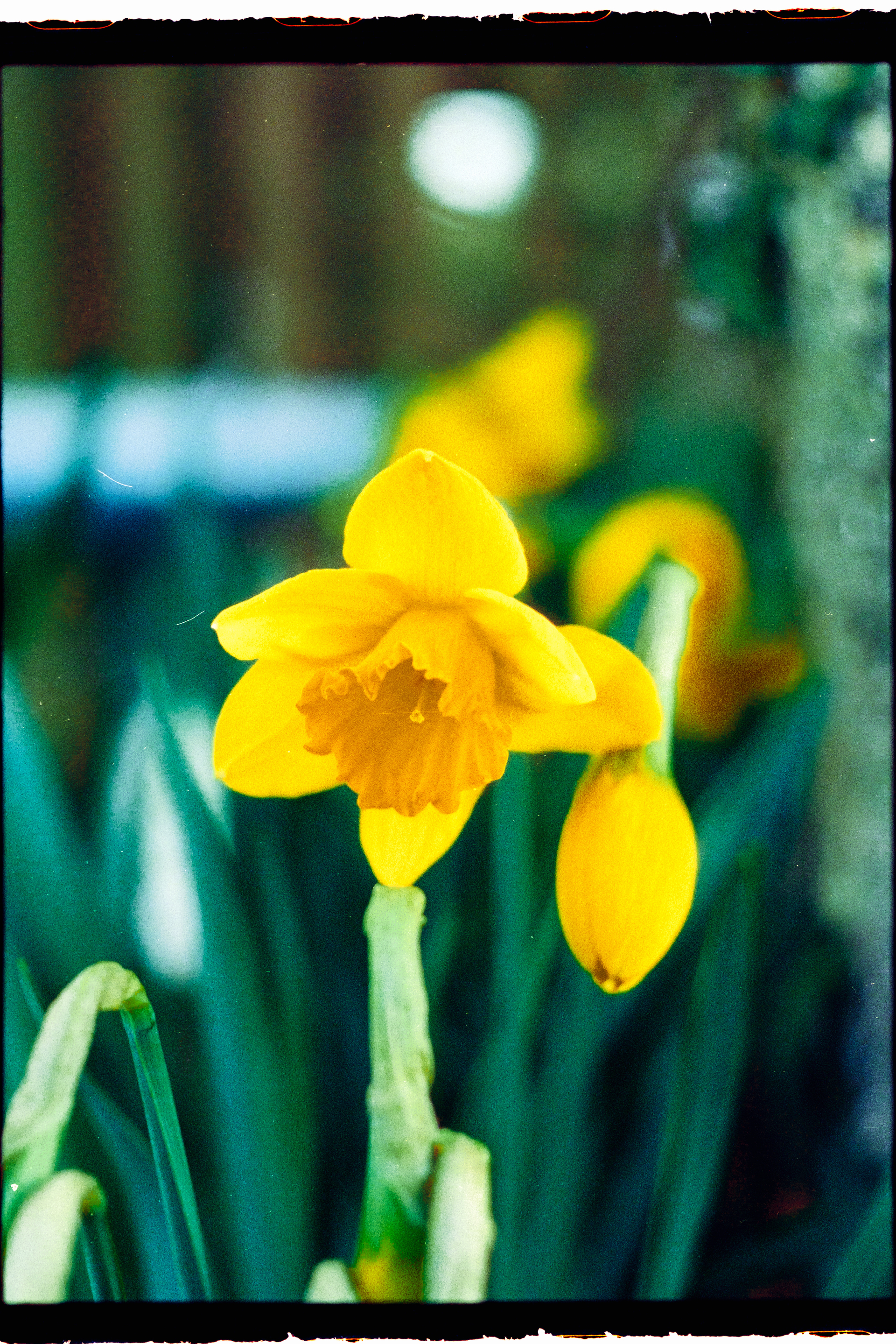
All said, my final image below, with some adjustments and clean-up. Ultimately, I’m happy with this as a random test shot and especially within the characteristics of the specific film stock.

Also - for further comparison, the default color model vs Adobe Color profile on Portra 400. Much better results. :+1:

Hi Jacob,

Yes, resetting negatives can be tricky, but in the final analysis my experience is that it usually works. Anyhow, glad you got it going finally and all’s well that ends well. Have a good night and happy New Year.

Best regards,

Mark

| JacobP
December 29 |

  • | - |

Hi, Mark -

Following your guidance, I attempted to replicate your results, primarily through the modification of the Color Model during conversion. Frustrated as my results were not mirroring your own, I discovered there’s a bug in NLP - specifically, that “Reset 1 Photo(s)” on the Convert Tab does not actually do what the mouseover states. Rather, there seems to be no difference between it and “Uncovert 1 Photo(s)” as both retain all NLP settings after reverting back to the negative, including the Lightroom Profile. Can you confirm if you have the same bug?

Since I converted all my negatives on the roll in batch, and then reset this specific negative when I was attempting to get different results, Lightroom was maintaining the Profile of “Negative Lab v2.3 - Frontier” when I was selecting “None” as the Color Model the second time around (which seems to be coded to make no changes to Lightroom’s Profile setting, since it’s assumed Reset would have worked). I also found that changing the Lightroom Profile to “Adobe Color” after conversion yields radically different results than setting that prior to NLP conversion and seems to cause issues with NLP edits moving forward - though this might be expected behaviour based on how NLP works.

For posterity and any future forum-goer with similar problems, my steps to get the correct color profile are:

  1. “Reset 1 Photo(s)” in NLP - Convert Tab; click Apply
  2. Change the Lightroom Profile in the Develop Module to “Adobe Color”
  3. Select White Balance from film margin, crop down to just negative, if not previously done
  4. Open NLP, change Color Model to “None”, click “Convert 1 Negative”
  5. Ensure Analysis under the Roll tab is set to “This image only”. Mine is often blank and the WB auto settings (Auto AVG, Auto-Neutral, Auto-Mix, &c.) won’t work unless this corrected.
  6. Reset individual settings in NLP Edit Tab one-by-one if previous changes were made
  7. Profit.

Regarding your comments on the high ISO / film quality, the photos were taken with my Olympus Pen F which is a half-frame camera. The small negative coupled with the 400 ISO film, I’m willing to accept I’m pushing up against the limits of the film which is generating the “noise” when boosted. I don’t find it all that abrasive - at least it isn’t the neon green from my initial conversion. :slight_smile:

I really appreciate your help, Mark. Had I not seen you were able to yield reasonable results, I may not have ferreted out the Color Model / Profile issue that came from reseting the negatives.

All said, my final image below, with some adjustments and clean-up. Ultimately, I’m happy with this as a random test shot and especially within the characteristics of the specific film stock.

Final Image

@Mark_Segal , something seems to be missing where I put the XXXXX marker.

Please add that word or a screen of what exactly makes NLP ignore its own profiles. This could help others (incl. myself) in similar circumstances.

Hi Digitizer - my goodness you’re right - my mind must have been racing ahead of my fingers. The missing word is . Jacob would have seen that because I sent him the screen grab with the setting in the NLP tab. Thanks for pointing this out.

So, once one selects as the Color Model in the tab, two things happen: (i) it disables further use of colour management settings in the color management panel of the NLP tab, and (ii) it reverts the camera profile that Adobe uses in Lightroom to its default, which is normally Adobe Color, instead of the NLP profile.

I should add, in my experience, needing to resort to this move is rare. Normally with the Color Model set to conversions produce good results, and fine results with some tweaking thereafter. I have seen something like it once before, years ago in a digital capture, with a particularly delicate shade of red, again in a flower, which Lightroom was not capable of rendering without clipping detail, whereas Capture One handled it properly. And that too was a rare occurrence. So while all these applications are generally fine, periodically one gets a case where one can do something properly that the other cannot. The underlying mathematical causes of these situations are well beyond my and most peoples’ pay-grade, but as mere users we find the workarounds and carry on.

Try again…and don’t use any modifiers except the ones offered by the forum software. Some characters effectively hide the text :wink:

First tab, I presume :wink:

Screenshot?

Sorry for being obnoxious :wink:

Nothing to apologize for - none of our faults; I’ve never come across this kind of problem. OK the missing word was None. No color model. It is the setting for Color Model in the Convert tab. Once one triggers it, the camera profile in Lightroom changes to the Lightroom default which is usually Adobe Color. Hope this helps. Please let me know if there remains a problem.

@Mark_Segal , thanks for the details. And yes, the text appears to be complete now.

During my tests, I usually found that the named colour models produced easier-to-use starting points. I mostly start with „Basic“ and very low presaturation and a second-tab preset that rolls off highs and lows with a clip margin of minus 10 each. Conversions look fairly bland but can be handled with ease without clipping, e.g. with „Structure“ and the other acutance tools.

Yup - I agree - a starting point somewhat on the bland side is useful to make sure we aren’t compressing or losing data - it’s always easier to build the image from there, but usually not possible to get back what we can lose with a too contrasty starting point.

I just want to highlight that selecting None as the Color Model doesn’t actually revert the Lightroom Profile back to the default, but rather it leaves it unchanged from whatever it was set at when NLP was opened that specific time. This seems like a pedantic difference to highlight, but was the source of much frustration when the “Reset” wasn’t setting the Lightroom profile back to Adobe Color - resulting in both the “None” profile and the “Frontier” to be the same, unless you are converting the negative for the first time. Screenshot below demonstrating the incorrect Lightroom Profile for the Color Model.

Thank you! Same to you - Happy New Year!