Great ingenuity. I am sure people are keen to see color examples. If you have any to share, would you make a new topic/post and show us ?
@mcastilha , have you tried the colour head with medium format negatives?
The M605 head I have is good for FF, but on MF, it shows fairly noticeable unevenness.
That’s a good idea for the future. For now, I wouldn’t worry about it, since I only have a few medium-format negatives, all of which have been nicely digitized by labs. The enlarger column and base are so large and heavy that I actually prefer this setup for 35mm.
As hot air rises, what I usually do is open the hole meant for the E27 bulb conversion. Since the unit is upside down, that hole ends up being on top of the halogen bulb. Raising the unit a bit could also help improve airflow, and I’ll probably try that.
I don’t have a proper diffuser or film holder for medium format, although I’d like to. I should mention that I live in Brazil, and it’s quite hard to find this kind of equipment here.
Sselvidge,
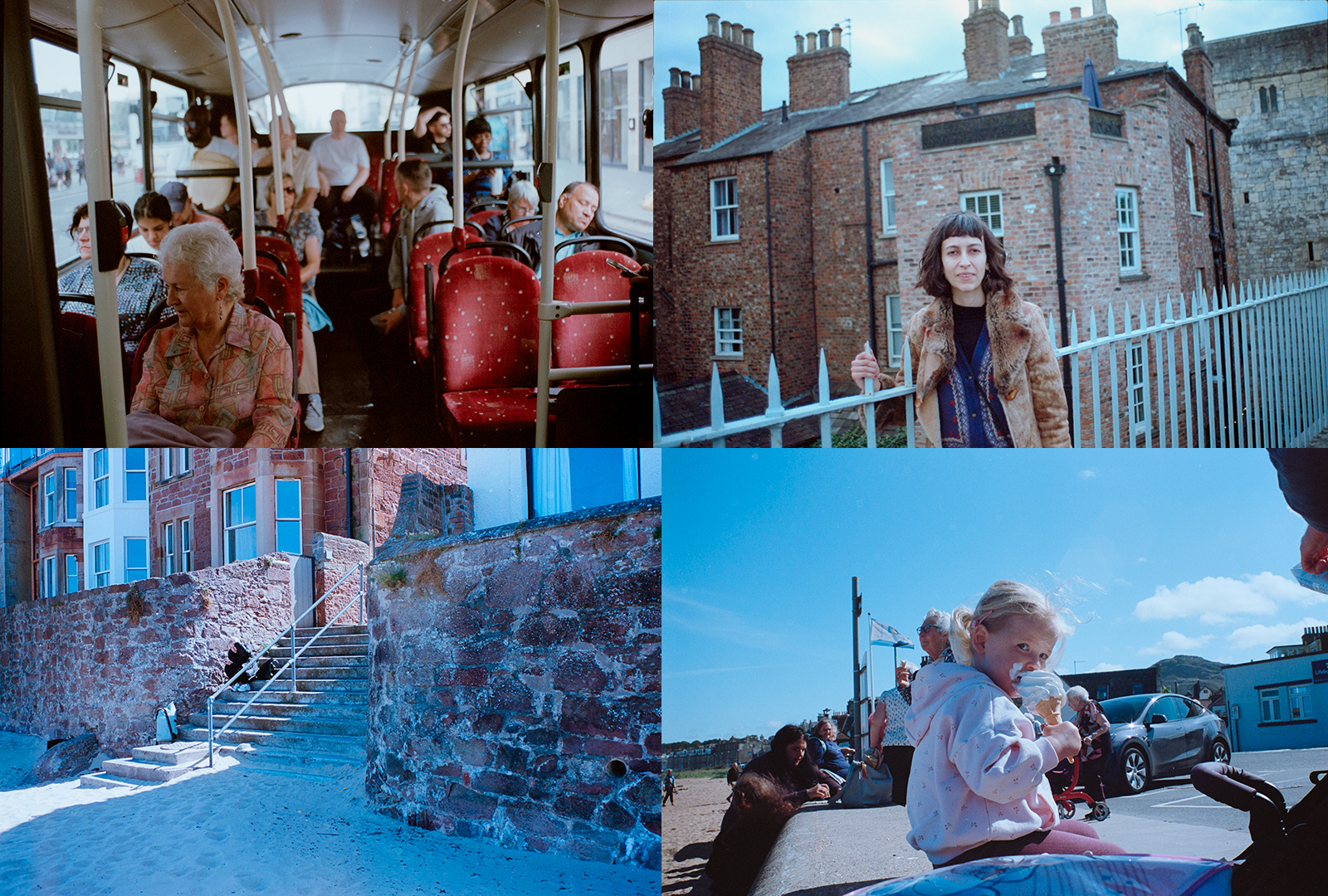
Thank you! I’ll start by sharing some color shots I took on a recent trip to the UK. They were shot on Kodak Aerocolor 100, a color negative film with a clear base, which I find nice and easy to work with. These shots were underexposed by two stops (EI 400) and then pushed one stop (N+1).
1 Like
Let me try to post it again (I deleted the previous one while trying to edit it).
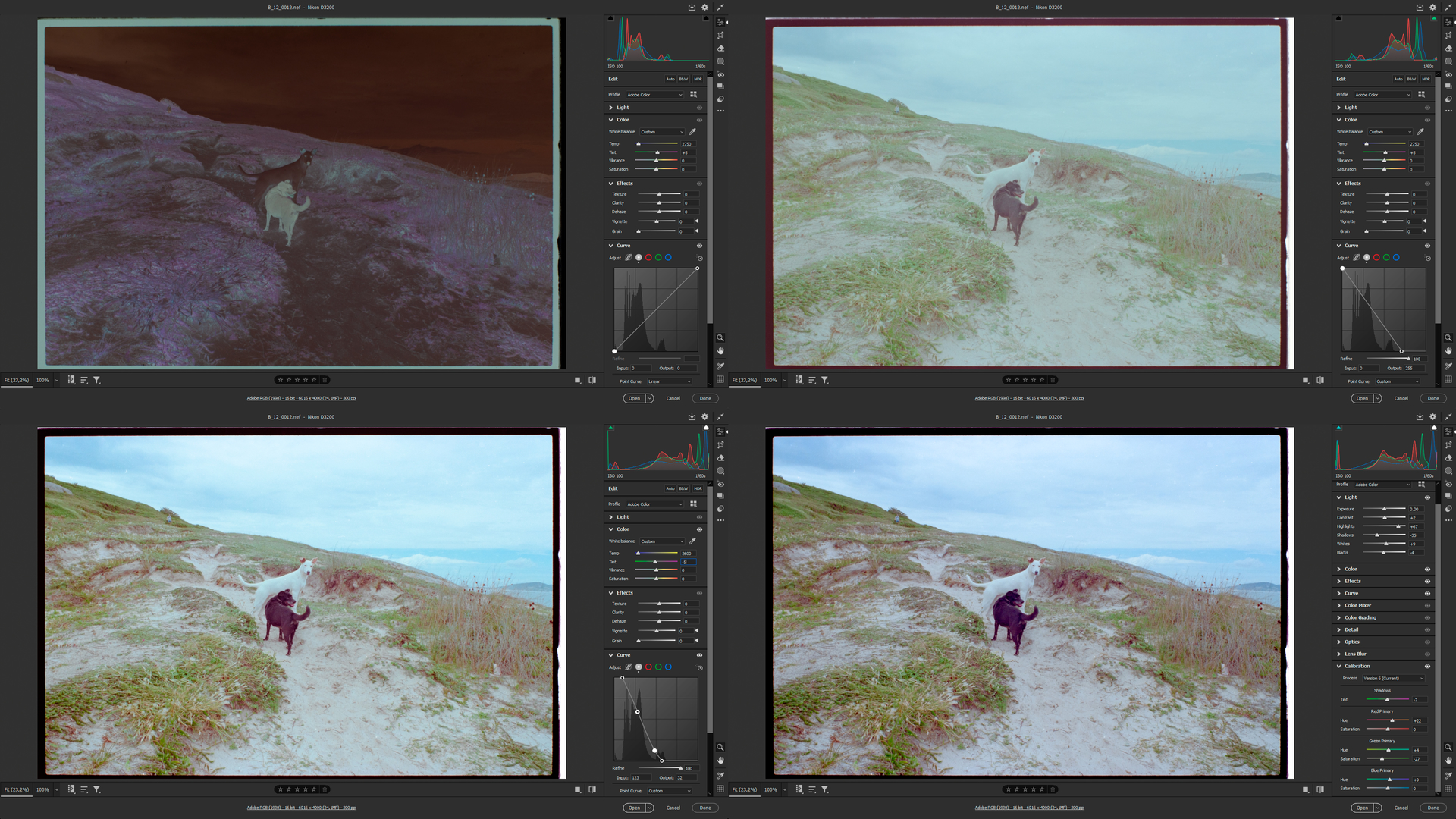
Now I’ll show you the process of a (fast) digital development of a shot taken on Kodak Pro Image 100 about 12 years ago. This stock has an orange mask, so I filtered it using the enlarger color head. The first screenshot shows the original RAW file from the camera, followed by a few steps to obtain a flat file to work on in Photoshop. By the way, I think the screenshots messed up the color spaces, as they look quite different from the ACR preview—but you’ll get the idea.
Setup: Fujifilm X-E3, Urth M39 to X-Mount adapter, M42 to M39 Helicoid adapter, Schneider Componon-S 50mm f/2.8 Lens, Valoi 360 Enthusiast Scanning Lighting Kit & Essential Copy Stand v2


I made three carriers for 35mm, 645, and 6x7 negs.
Here’s mine:
GFX 100s on home-made copy stand using adapted Mamiya 120mm Macro lens and Negative Supply 4x5 Light Source Basic MK2 and several of their negative carriers for 35mm, 120mm and 4”x5”. I am utilizing a Tilta wireless follow-focus system to allow very fine control of the lens focus ring without actually needing to touch the camera while doing so. Additionally, I am using a NiSi macro focusing rail for super fine adjustment of both camera height and focus.
I have a fairly substantial stash of (mostly B&W) negatives shot between ca. 1994-2008 (at which point I transitioned to shooting digital). I’m actually now looking to get back into shooting film and will likely be buying some flavor of MF film camera in the coming months. But I already currently have hundreds of 4x5 negs, and thousands of MF negs (mostly 6x6 with a smattering of 6x9) that I need to scan and process.
This is v2. Currently working on v3 which will incorporate a Pentax 67 Auto-Bellows system and Schneider 135mm Componon S enlarger lens.
I’m always looking to improve, so please let me know your thoughts.


Lots of food for thought there, very technically advanced, I’ve never seen that Tilta remote lens focus drive. In my experience, and with smaller more tolerant sensors and less megapixels, I find that focusing with the lens is imprecise because it is at the same time changing the magnification but also adjusting the focus. For me this leads to a kind of ‘no man’s land’ of indeterminate sharp focus. I find it far better to move the camera and lens together just as you can do with the NISI rail, though not remotely.
Do you find that lens good for copying 35mm, and if so do you attempt to fill the width of your large 101MP sensor at 1.2x, or do you perhaps hold back and keep to 1:1 since that would still give you a very ample 60MP?
Hi Harry, thanks for your input. Regarding using the Mamiya 120mm for capturing 35mm negatives, I honestly don’t use it for 35mm; I actually use a Canon EF 100mm f/2.8 L Macro for 35mm as it is just a tiny bit sharper in the center. I find the 60MP scans I get in the GFX’s 35mm mode are adequate for whatever I do with the 35mm negatives. But to be fair, 35mm comprises about 10% of all the stills film I have shot, so I haven’t really spent a ton of time scanning 35mm film.
I did a lens shootout between the Mamiya 120mm, the TTArtisan 100mm Macro, and the Canon, and while the TTArtisan was marginally sharper than both other lenses in the center, it was really, really bad in the corners. Just awful. CA was off the charts and not correctable. The Mamiya is sharp, sharp sharp in the corners in all shooting modes on the GFX, although (as previously stated) the Canon was marginally sharper in the very center, so for 35mm scans, it is the one I use. But for all other formats I am scanning (6x6, 6x9, 4x5) the Mamiya is much better because of the the edge to edge performance.
I am looking forward to seeing how v3 of this rig will perform using truly flat-field glass (i.e. - enlarging lenses).
I do hear what your saying regarding using the focus ring, but keep in mind that the way I set up the follow focus, I am mapping the entire ~330º rotation of the focus knob on the Tilta remote to maybe 1º-2º of the focus ring rotation on the lens, so I have extremely fine control and am only doing very, very fine focus on the lens, so the change in image size is practically non-existent. I find that adjustments using the NiSi rail are so fine that the mere act of putting my hand on the knob has a more pronounced effect on the position of the camera than turning the knob on the NiSi. Having said that, the NiSi rail is a brand new addition, so the jury is still out as to which method I prefer (wireless follow focus or Macro rail). If I could figure out how to attach the follow focus to the knob on the NiSi rail, that would be the ultimate in hands-off control! 
I have the impression that the whole setup is hanging from one screw on each side of the Nisi rail …and that this might lead to a fair bit of up/down movement and shifts of the lens, which might defy fine tuning focus distance with said rail. If that should be the case, motorised focusing is the way to go.
If you had a second clamp for the column, you could attach the rail on both ends for less wobble.
And unless you frequently zoom in and out mechanically (for enlarged crops), the rail might not be necessary at all, but you have decided to use one.
For rigid setups, I can recommend something like shown here.
You are spot on with the one-bolt attachment of the NiSi rail. It is definitely the weak link. It hadn’t even occurred to me to add a second clamp; that’s a brilliant idea. I would need to tap the NiSi rail for a second mount point, but that’s an easy mod. I only just built the copy stand last weekend, so I’m still getting things sorted with that, and the camera mounting to the column slider/clamp has been my primary concern. I was previously using a Negative Supply stand which I found to be over-priced for what it is, and honestly not particularly stable. The one I built is much more stable. However, as stated, the weak link is the where the camera mounts to the column slider. Adding a second would address multiple concerns, with or without the NiSi rail.
Thanks so much for your awesome suggestion!
If you look at @Digitizer’s elegantly simple but solid solution you’ll see that below there is a bit of a discussion of alternatives to that Nisi rail, inevitably most are much more expensive though. The Castel M looks great but you are also paying for some sophisticated macro features that you won’t be needing. The Velmex looks more or less ideal but certainly not that easy to get hold of secondhand. Robert O’Toole of Closeuphotography.com used one, in fact I think the one pictured might actually have come from him. Swebo is an unknown for me but worth looking into.
On the face of it a motorized macro rail would seem ideal for your purposes, as used by both Robert O’Toole and Jim Kasson and eminently suitable for stacking, or just finding the optimal focus..
That does look very rigid, but for my use case, I need a lot of vertical travel to accommodate everything from 35mm negatives up to 4”x5” sheet film. The Velmex unit likewise seems very rigid and industrial, though I’m not convinced it adds much over the NiSi rail. I’ve ordered a second slider clamp for my current setup as @Digitizer suggested. I’ll connect the two column sliders with a metal strap and tap the NiSi rail for a second mounting point and then mount it to the metal strap. We’ll see how well that stabilizes things. But frankly, the NiSi macro rail may be rendered redundant once I get my bellows system integrated as it already incorporates an integrated focusing rail:


The bellows arrives tomorrow, so we’ll see how precise it is. If it is as solid as it looks, I think I got a pretty good deal at ca. $164 USD. As previously stated, I’ll be using this with enlarging/copy lenses. I already have a Schneider 135mm Companion-S to begin testing with. This lens fared quite well in one of Robert O’Toole’s lens shootouts: Tube Lens Test: 135mm Enlarging Lenses — Close-up Photography
Depending on how my tests go with the lens and bellows, I will likely upgrade the Schneider Componon to one of the highly regarded APO lenses at some point down the line.
Going down the way with trying this and that to build on’s own rig leads to a level of cash-out for a Frankenstein setup. Depending on how far one goes, it might be less expensive to just get e.g. the Novoflex Stack Pro solution and bolt that to a solid board.
Nevertheless, lighting the negatives and mounting the holder to the lens/bellows remains to be a more difficult and important venture. For ultimate flexibility, we’d need another bellows and rail…and I wonder why no-one has come up with such a product yet. I have an old solution like that, but it only serves for duplicating 135 format negatives…and the former owner has epoxied all mounts for stability  which makes it difficult to replace the mounts. Grrr.
Your sentiment is certainly not lost on me. But anything Novoflex is well beyond my budget. I have spent a fraction of the cost of any Stack Pro solution even if you include the underwhelming Negative Supply copy stand that I previously purchased (and will now sell!). Unfortunately, there just aren’t a lot of affordable turn-key options out there for camera scanning right now, so piecing something together seems the only approach currently. Thankfully, I do like to tinker and happen to be handy with tools and such!
And to be clear, I will merely be using the bellows as a macro-extension for the enlarger lens. This bellows/lens setup just replaces the dedicated macro lenses I am currently using. Nothing else about the scanning setup will change. Negatives will still be mounted and illuminated using the Negative Supply carriers and light source, so no need for a second bellows and rail. I did do a fair amount of research on macro bellows options before landing on the Pentax 67 Auto-Bellows, and by all accounts it is a very sturdy, beautifully crafted unit. Ultimately, I was looking for something that would serve multiple functions, not just for scanning work.
1 Like
Those bellows look excellent, have you solved the problem of mounting an L39 enlarger/duplicating lens to it? I’m wondering if a 49mm Pentax 67 Reversing adapter might be a starting point?
I have. I made sure that problem was solved before even purchasing the bellows.
I stumbled upon this thread on DPReview while researching the the Pentax bellows which led me to Rafcamera who specialize in unusual or otherwise hard to find camera/lens adapters. They also do custom adapters, so for $39 USD I had them fabricate a Pentax 67 to M42x0.75 adapter (my Companon has an 42mm mount although I know they were manufactured in several thread sizes over the years). I also ordered the special short Pentax 67 to GFX adapter mentioned in the DPReview thread which Rafcamera now regularly stock (i.e. - it’s no longer a custom adapter). Both adapters were a total $109 USD including shipping from Belarus. I am very happy to have found them. As a cinematographer and photographer with an interest in exploring vintage glass, I am in constant need of lens adapters of one type or another!
That seems very good value, I have one of their adapters as well, Robert O’Toole used them a lot I think. 42x0.75 is also the T-Mount thread I think.
You are correct sir (in my best Ed McMahon voice).